Model Providers
A model provider is an account CodeAlta sends requests to: its credentials, its endpoint, its models, and the model and reasoning effort it uses by default. A session runs on one provider and model at a time, and can switch to another.
- Set up a provider: Claude Code, Codex, Codex CLI, Copilot, API keys and custom endpoints, one by one.
- Configuration file: every provider setting of
~/.alta/config.toml. - Agents of the ACP registry: coding agents such as GitHub Copilot or Gemini CLI as providers.
- Model tiers and fallback: Complex, Standard or Quick instead of a model, and another model when a provider fails.
Open the providers
Ctrl+G Ctrl+Ror/model_providers.- CodeAlta Desktop: Settings > Providers, or N active providers in the ⋯ menu of the prompt.
- CodeAlta TUI: the Model Providers dialog.
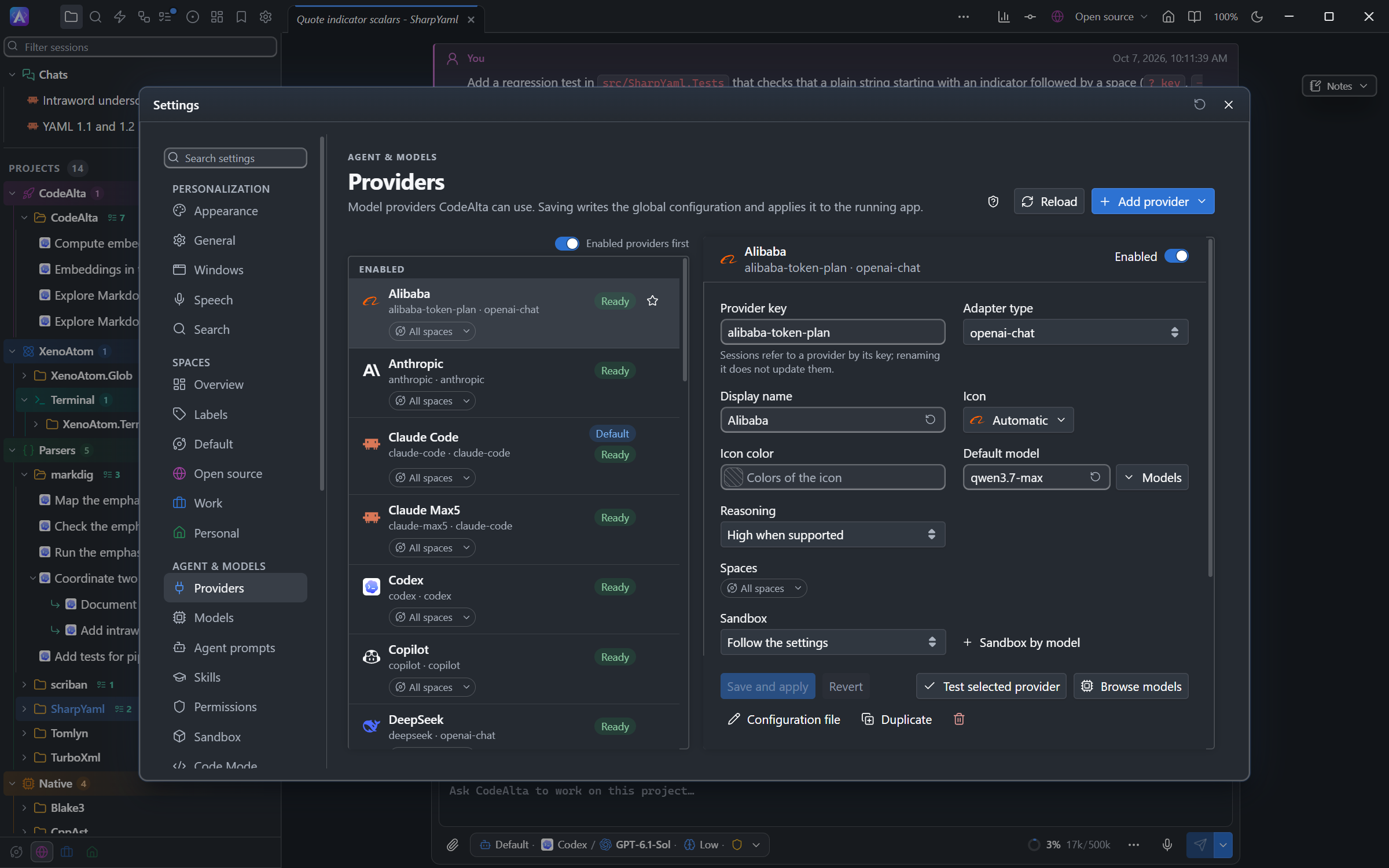
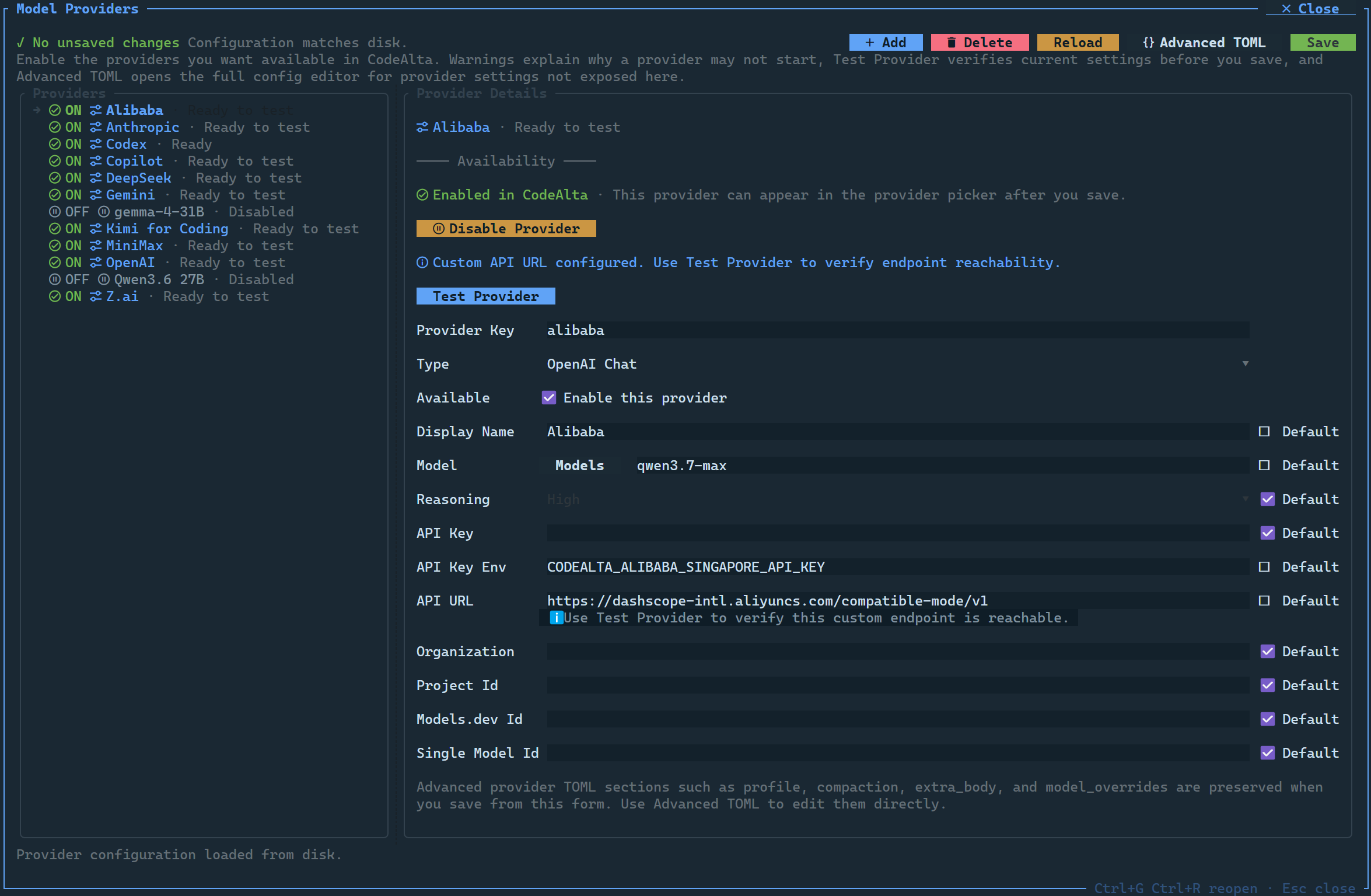
Both apps edit the same ~/.alta/config.toml and share the same credentials: a provider set up or signed in from one app is ready in the other.
In CodeAlta Desktop, the list shows the enabled providers first, then the disabled ones; turn off Enabled providers first above the list to keep the order of the file. The star of a row makes a provider a favorite: the favorites come before all the others.
To set up a provider:
- Select it, or add it with Add provider.
- Give its credentials: an environment variable, an API key, or a sign-in.
- In CodeAlta Desktop, choose Save and apply, sign in when asked, then Test selected provider. CodeAlta TUI can test the changes before saving them.
- A successful test or sign-in enables the provider.
The test checks that the provider starts and lists its models; it does not prove that every request will succeed. Refresh (/model_providers_refresh) reloads the file and tests the providers again, for example after you start a local model server.
The provider form
The provider editor can:
- add, delete, enable and disable providers;
- in CodeAlta Desktop, Add provider lists the built-in providers you do not have yet; Custom provider… adds an entry of your own, and ACP registry… adds a coding agent;
- in CodeAlta Desktop, Duplicate a provider to add another account of the same type;
- in CodeAlta Desktop, set the Icon and Icon color of a provider, and its Spaces with the chip of its row (see Providers of a space);
- in CodeAlta Desktop, run the sessions of a provider, or of one of its models, in a Sandbox, for example a provider of local models you trust less (see Sandbox);
- in CodeAlta Desktop, choose the Code Mode of a provider, or of one of its models (see Code Mode);
- in CodeAlta Desktop, choose the Model order of the lists: the provider's order, by name, or by name with the newest version first, the default for ACP agents;
- store an API key, or name the environment variable that holds it;
- check keys, endpoint URLs, missing credentials and settings that conflict;
- start a browser or device sign-in, and show Signed out on a provider whose account is signed out, with how to sign in;
- keep the advanced settings of the file, such as
profile,compaction,extra_bodyandmodel_overrides; - open the whole file in an editor that checks it as you type (the Configuration file page of CodeAlta Desktop).
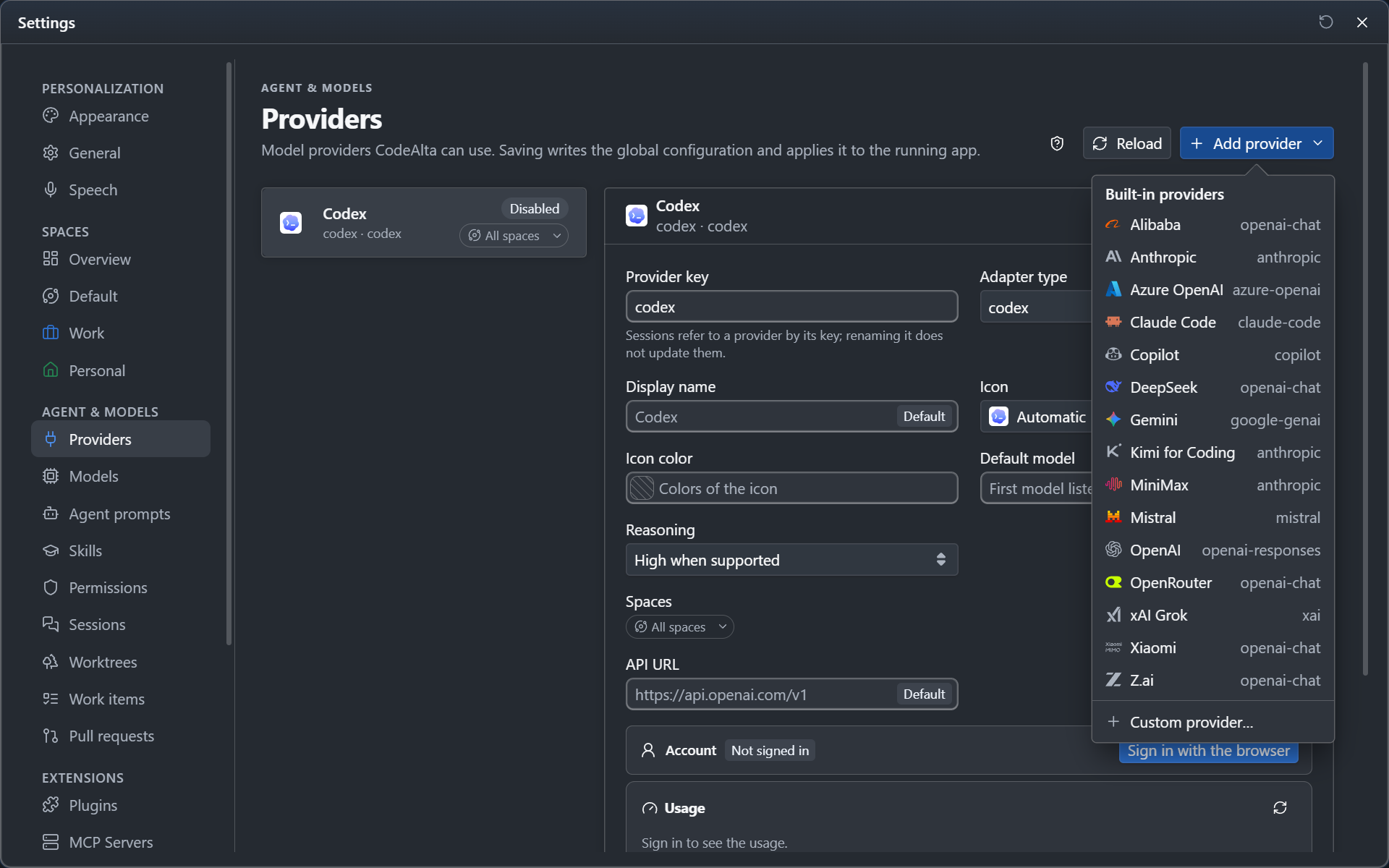
A Default checkbox beside a field means the field uses the default of the provider. Uncheck it to set your own value; check it again to remove that value from the file.
Default model
In CodeAlta Desktop, the Models button beside Default model lists the models of the provider: search by name or id and choose one, then Save and apply. You can also type a model id, or clear the field with Use the default.
When the provider no longer lists the default model, for example a model it retired, the list says so: choose another one. Until then, a new session without a model takes the first model the provider lists.
Changes and deleted providers
Saved settings reach the sessions already open: an idle session takes them at its next prompt, and a running turn finishes with the settings it started with.
A deleted provider leaves the model tiers, the global ones and those of each space; a provider given another key keeps its place in them under the new key. Its sessions keep their history:
- in CodeAlta Desktop, a session of a deleted provider switches to the default provider when you open it, and says so;
- without a default provider, or for a provider that is turned off, the session shows its provider as Unavailable and sends nothing until you choose another one.
Built-in providers
On first run, CodeAlta writes a ~/.alta/config.toml with these providers, all disabled. Later versions never add entries to your file, so a provider you removed or renamed stays that way. Enable only the ones you use.
| Provider key | Name | Type | Default model | Credentials |
|---|---|---|---|---|
alibaba |
Alibaba | openai-chat |
qwen3.7-max |
CODEALTA_ALIBABA_API_KEY |
anthropic |
Anthropic | anthropic |
claude-sonnet-4-6 |
CODEALTA_ANTHROPIC_API_KEY |
azure-openai |
Azure OpenAI | azure-openai |
your deployment name | CODEALTA_AZURE_OPENAI_API_KEY |
claude-code |
Claude Code | claude-code |
chosen by Claude Code | the Claude Code CLI signs in by itself |
codex |
Codex | codex |
gpt-5.5, high reasoning |
ChatGPT sign-in |
copilot |
Copilot | copilot |
claude-sonnet-4.6, high reasoning |
GitHub sign-in |
deepseek |
DeepSeek | openai-chat |
deepseek-v4-pro |
CODEALTA_DEEPSEEK_API_KEY |
gemini |
Gemini | google-genai |
listed by the provider | CODEALTA_GEMINI_API_KEY |
kimi-for-coding |
Kimi for Coding | anthropic compatible |
kimi-for-coding, high reasoning |
CODEALTA_KIMI_API_KEY |
minimax |
MiniMax | anthropic compatible |
MiniMax-M2.7, low reasoning |
CODEALTA_MINIMAX_API_KEY |
openai |
OpenAI | openai-responses |
gpt-5.5, high reasoning |
CODEALTA_OPENAI_API_KEY |
xai |
xAI Grok | xai |
grok-4.3, high reasoning |
xAI sign-in |
zai |
Z.ai | openai-chat |
glm-5.1 |
CODEALTA_ZAI_API_KEY |
Kimi for Coding uses its international endpoint, https://api.kimi.ai/coding/. For an account in China, set API URL to https://api.kimi.com/coding/.
Default provider
A new session, a work item or an automation that names no provider starts with the default provider. Check Use as the default provider for new sessions on its page, or set it in the file:
[chat]
default_provider = "openai"
Without one, or when it is disabled, the default is the first enabled provider by name. CodeAlta Desktop marks it Default in Settings > Providers and in the provider lists.
Project settings
A project can set its own default provider, and the model and reasoning_effort of each provider, in <project>/.alta/config.toml. The providers themselves, their credentials and endpoints stay in ~/.alta/config.toml.
Do not commit secrets with a project. Use api_key_env in the global file so keys stay in your user environment.
Provider logos
CodeAlta Desktop shows the logo of each provider in the Providers and Models pages, on the provider and model of the prompt, and on every session of the sidebar. A model has the logo of its family (Claude, GPT, Gemini...) whichever provider serves it.
For a provider of your own, CodeAlta looks for a brand in its key, name and API URL (my-openrouter, or http://localhost:11434 for Ollama). To choose another logo, set icon and color:
[providers.work]
type = "openai-chat"
api_url = "https://llm.example.com/v1"
api_key_env = "WORK_LLM_KEY"
icon = "rocket"
color = "#22B8CD"
Subscription usage
Codex, Codex CLI, Copilot and Claude Code are subscriptions with limits. CodeAlta Desktop shows how much of each limit is used and when it starts over:
- in the Usage section of the provider, in Settings > Providers;
- under Subscription usage in the context usage of a session.
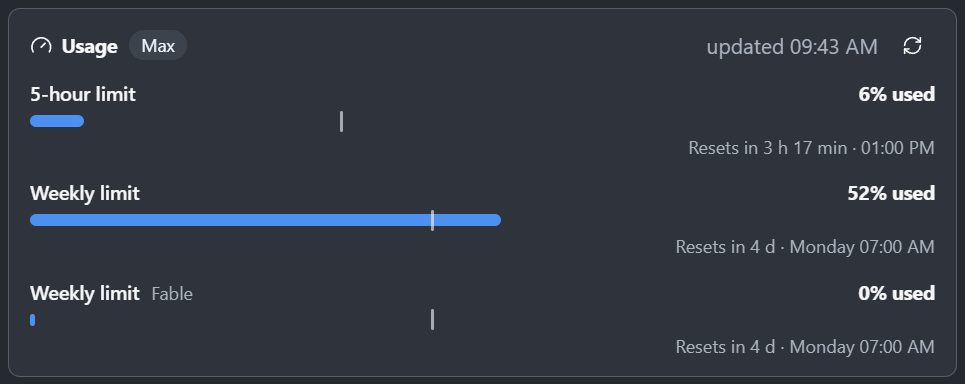
Each limit is a meter. Its fill is what is used; the small mark shows how far the period has gone, so a fill past the mark uses the limit faster than time goes by. A meter turns orange from 75% and red from 90%.
| Provider | What is shown | Where it comes from |
|---|---|---|
| Codex | The windows of the ChatGPT plan (5 hours, a week), the limits of a model, the credits | The Codex CLI of OpenAI (codex on the PATH, signed in with the same account) |
| Codex CLI | The same, for the account of the provider | Codex, in the folder of the provider |
| Copilot | The AI credits or premium requests of the month, chat and completions | GitHub, with the sign-in of the provider |
| Claude Code | The 5-hour window, the week, the limits of a model, the extra usage | The Claude Code CLI |
- CodeAlta asks when you open the page or the context usage, or choose Refresh usage, never in the background. An answer is kept for a minute.
- For Codex and Claude Code, CodeAlta asks the provider's command-line program and never reads its credentials. When the program is missing, or the Codex CLI is signed in with another account, the Usage section says so. For a ChatGPT plan, install the Codex CLI and run
codex login. - In a session, the limits the last turns reported are shown while they are recent.
Prompt caching
A session sends its whole conversation with every request. A provider bills the part it has already seen at a small share of the input price when that part comes from its prompt cache. CodeAlta keeps the start of each request the same and asks for caching the way each protocol wants it:
| Requests | What CodeAlta sends | What the usage reports |
|---|---|---|
Anthropic Messages: the anthropic provider and the Claude models of Copilot |
cache_control markers on the system prompt (its part that every session of the project shares), the last message and the message that ended the previous request; nothing is cached without them |
Cached input and cache write tokens |
OpenAI API: the openai-responses provider |
Nothing: the API caches a repeated start by itself. The lines of the session alone (its folder, its scratchpad) come after the instructions and the tools, so the sessions of a project share their cache | Cached input and cache write tokens |
| OpenAI Responses of Copilot (GPT, Grok and other models) | The session id as prompt_cache_key, so its requests reach the cache that holds its conversation |
Cached input, and cache write tokens for the models that bill them |
| Codex | The session id as prompt_cache_key |
Cached input |
| Other OpenAI-compatible and Google endpoints | Nothing: the endpoint caches a repeated start by itself when it can | Cached input when the endpoint reports it |
The context usage of a session shows the last request: its input, how much was read from the cache (cached input) and written to it (cache write). For Copilot it also shows what GitHub billed for it, in AI credits.
A cache lasts five minutes after the last request for the Anthropic API and the Claude models of Copilot, 30 minutes for the OpenAI API and Codex, and an unstated time for the others. The first request after a longer pause, a change of the session's tools (a tool or an MCP server activated) and a compaction are paid at full price, then cached again.
The anthropic provider can keep its cache for one hour:
[providers.anthropic]
prompt_cache_ttl = "1h"   # "5m" (default) or "1h"
A cache write then costs twice the input price instead of 1.25 times; a read costs the same. The hour pays when the next request of a session often comes more than five minutes after the previous one: you answer after a pause, or a model thinks a long time between two requests.
When a request fails
The card of the error in the timeline shows, under Details:
- the error, the kind of failure (an exhausted quota, a rate limit, a provider that stays unavailable...) and the errors it wraps;
- what the provider returned: its error
codeandtype, the HTTP status, therequestIdto quote to its support, how many requests were sent, and the body it answered with.
Each retry and each fallback stays in the timeline with the error that caused it, also after a restart. The log of CodeAlta has a warning for each failed run and each retry, and alta session report <session-id> gives the same details in finalError, so an agent can diagnose a session for you. Tokens are removed from these details and long bodies are cut; protocol_trace gives a full trace of the requests.
With model tiers, a session whose provider runs out of quota or stays unavailable can go on with the next model of its tier.
Models and reasoning
The models of a provider come from its API when it lists them. CodeAlta completes what it knows of each model from the models.dev catalog: it finds the models.dev provider with the same api_url, else the one named like the provider key, else the one of the provider type, and looks up a model it does not list under its vendor (claude- under Anthropic, gpt- under OpenAI...). The configuration file can name the catalog entry, keep only some models, or correct their limits.
The Models page of CodeAlta Desktop shows each model's limits, price per million tokens, inputs, knowledge cutoff and release date. For a subscription (Claude Code, Codex, Copilot, a coding plan), it shows the price of the model's vendor and names it.
Reasoning effort is chosen per provider and model:
- a model that does not reason shows the effort that applies to it;
- when the provider lists every effort a model has (Claude Code, Copilot, the Anthropic API), a model that lists none, such as Claude Haiku 4.5 on Copilot, is sent no effort;
- on the Anthropic API, a model that takes both
xhighandmaxoffers XHigh and Max; XHigh is sent asmaxto a model that takesmaxand notxhigh; - Claude Haiku 4.5 and Claude Sonnet 4.5 on the Anthropic API think with a token budget: Low, Medium, High and XHigh give 1,024, 8,192, 16,384 and 32,768 tokens.
Context and compaction
The context ring below the prompt measures the session against the model's input limit. When only the total context window is known, CodeAlta uses it as the input limit; when the output limit is known too, the input limit is the context window minus the output limit.
When the context reaches 95% of that limit, CodeAlta compacts the conversation: a summary takes the place of the earlier turns. Claude Code and the agents of the ACP registry compact their own context.
Some models offer several context sizes: on Codex and Codex CLI, the model's maximum; on Claude Code, 200K or 1M for a model of 1M tokens; on Copilot, the size of a model's standard price, by default, or the larger size of its long-context price; on the Anthropic API, 200K for a model of more tokens; on the OpenAI API, a GPT-6 model's standard price (272K), by default, or its whole input. On a provider of the OpenAI or Anthropic protocols, a model whose price rises past a prompt size can also keep to that size. Choose one under Context size in the provider's settings, or for one session in More options of the Agent chip. The chosen size becomes the input limit.
- When a model's input limit is unknown, compaction assumes 128,000 tokens.
- After a context-overflow error, it uses the size of the last request the provider accepted, and summarizes the conversation in parts that fit in it.
- Set the real limits in model metadata overrides, and tune compaction in compaction settings. Most users keep the defaults.