Git plugin
The built-in Git plugin connects CodeAlta to the service that hosts your repository: GitHub, GitLab, Azure DevOps or Bitbucket. It feeds the Issues tab of CodeAlta Desktop, adds issue lookup in prompts, and gives agents your provider's command-line tool when it is installed.
| Provider | Detected from the git remote | # lists |
Agent tool |
|---|---|---|---|
| GitHub | github.com |
Issues | gh |
| GitLab | gitlab.com and self-managed instances |
Issues | glab |
| Azure DevOps | dev.azure.com and <organization>.visualstudio.com |
Work items of the project | az |
| Bitbucket | bitbucket.org |
Issues |
CodeAlta reads the remotes of the project folder, prefers origin, and recognizes HTTPS and SSH remotes.
Install your provider's CLI and sign in once: GitHub CLI (gh auth login), GitLab CLI (glab auth login) or Azure CLI (az login). Issue lookup then uses the same sign-in, and agents work with issues, pull requests and pipelines through the official tool.
Issue picker
Type # in the prompt to search the issues of the project's repository, most recently updated first. Type a number or words to filter, and press Enter to insert a Markdown link:
[#18](https://github.com/org/repo/issues/18)
[#18](https://gitlab.com/group/project/-/issues/18)
[#18](https://dev.azure.com/organization/project/_workitems/edit/18)
- Closed issues are listed too; Include closed (
Ctrl+I) hides them. - In CodeAlta Desktop the picker also lists pull requests and merge requests, with their own icon.
- On Azure DevOps it lists the work items of the project that owns the repository, of any type, matched by title.
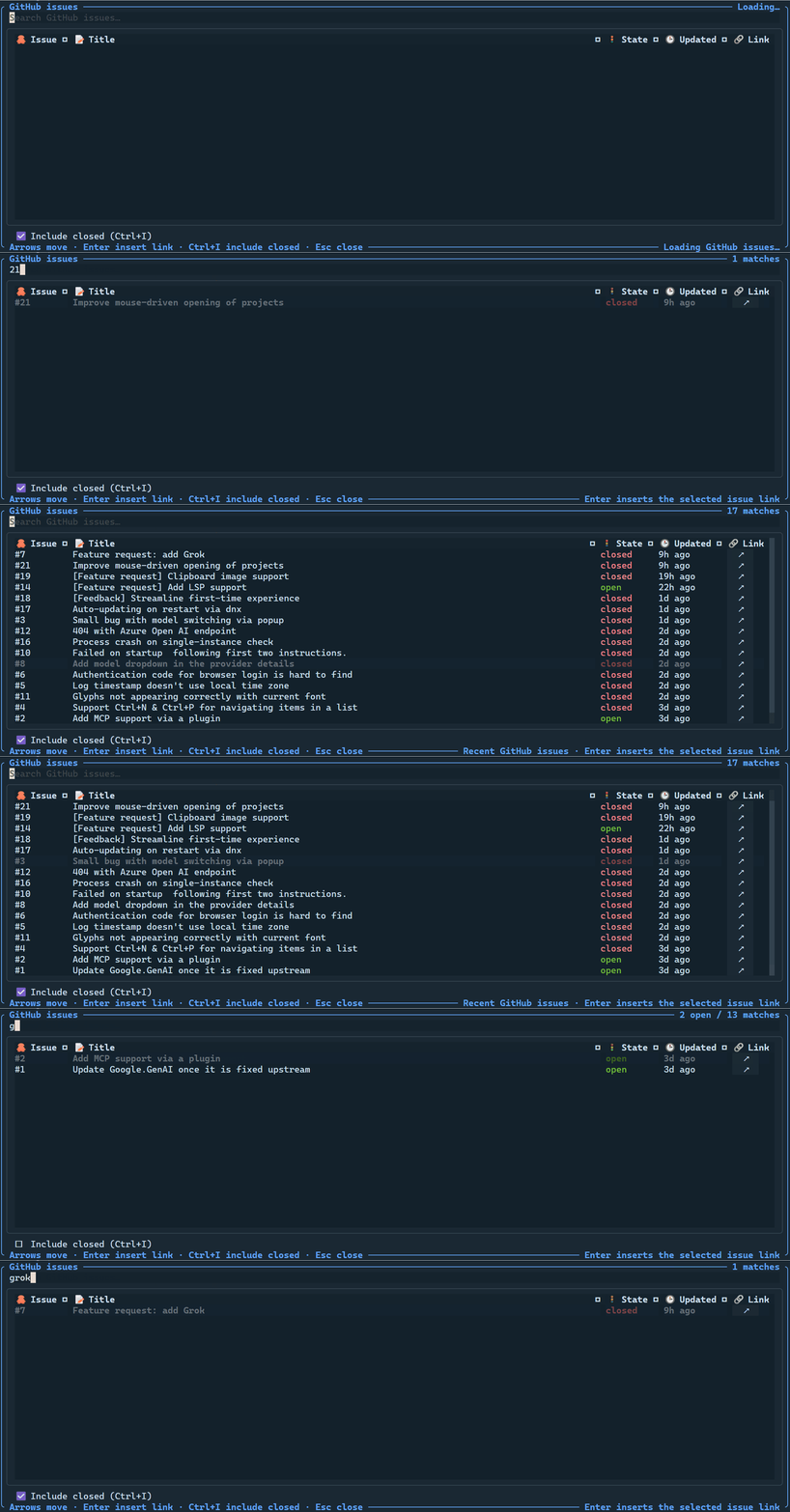
# issue picker in CodeAlta TUI, on a GitHub repository. The selected issue is inserted as a Markdown link.On Azure DevOps, the Issues tab can also show the work items of a team, a sprint, assigned to you, of a type, or by any field: see Filters, and the pull requests that wait for your review, also through your groups: see Pull requests. A personal access token needs Work Items (Read), Project and Team (Read) to list teams, Code (Read) for pull requests and Identity (Read) for your groups.
Sign-in for issue lookup
CodeAlta looks for credentials in this order, and sends them only to their own provider:
| Provider | Environment variable | Command-line tool |
|---|---|---|
| GitHub | GITHUB_TOKEN, then GH_TOKEN |
gh auth token |
| GitLab | GITLAB_TOKEN, then GITLAB_ACCESS_TOKEN |
glab config get token --host <host> |
| Azure DevOps | AZURE_DEVOPS_EXT_PAT |
az account get-access-token |
| Bitbucket | BITBUCKET_ACCESS_TOKEN, or BITBUCKET_USERNAME with BITBUCKET_APP_PASSWORD |
Without credentials, lookups are anonymous: public GitHub and GitLab projects work, with lower rate limits. Private projects and Azure DevOps need a sign-in.
GitHub profile of a space
When the space of a session has a GitHub profile in its Identity, the session's gh tool runs with that profile, and issue lookup uses its token. The window uses the profile of the space it shows. A GITHUB_TOKEN or GH_TOKEN in your environment still comes first.
Self-managed GitLab
A host name that starts with gitlab. (such as gitlab.example.com) is recognized. For another host, set GITLAB_HOST, as for glab:
export GITLAB_HOST=code.example.com
GITLAB_TOKEN and GITLAB_ACCESS_TOKEN apply to GITLAB_HOST, or to gitlab.com when it is not set. For other instances, sign in with glab auth login --hostname <host>.
Agent tools
When gh, glab or az is installed, agents get a tool of the same name. It takes an arguments array passed straight to the program, never through a shell. For example, gh with:
issue view 18 --json title,state,url
or glab with:
mr list --assignee=@me
- The
aztool runs only the Azure DevOps commands:az boards,az repos,az pipelines,az artifactsandaz devops, from theazure-devopsextension (az extension add --name azure-devops). workingDirectorydefaults to the selected project and must stay inside it.- The timeout defaults to 60 seconds, at most 300.
- Every session has the tools. A Claude Code session sees them as MCP tools, such as
mcp__codealta__gh.
Disable it
Turn off the provider tools and the CodeAlta TUI issue picker with:
[plugins.git]
enabled = false
In CodeAlta Desktop the # picker belongs to the prompt and stays available. A [plugins.github] table from earlier versions must be renamed [plugins.git].