Plugin development
A source plugin is one C# file that CodeAlta builds and loads. CodeAlta Desktop builds it again while it runs, so a change shows at once. The same plugin runs in CodeAlta Desktop and CodeAlta TUI.
Build and load only plugins you trust. Building runs the .NET SDK, NuGet and MSBuild; loading runs the plugin's code inside CodeAlta.
The plugin API can change between CodeAlta releases.
This page covers the workflow and the core API. What a plugin shows in the window (HTML, scripts, buttons, canvases, cards) is on Plugin UI.
Ask an agent to write it
In CodeAlta Desktop, ask a session in your own words:
Write a plugin that shows the current git branch beside the prompt, with a command that lists the last ten commits in a dialog.
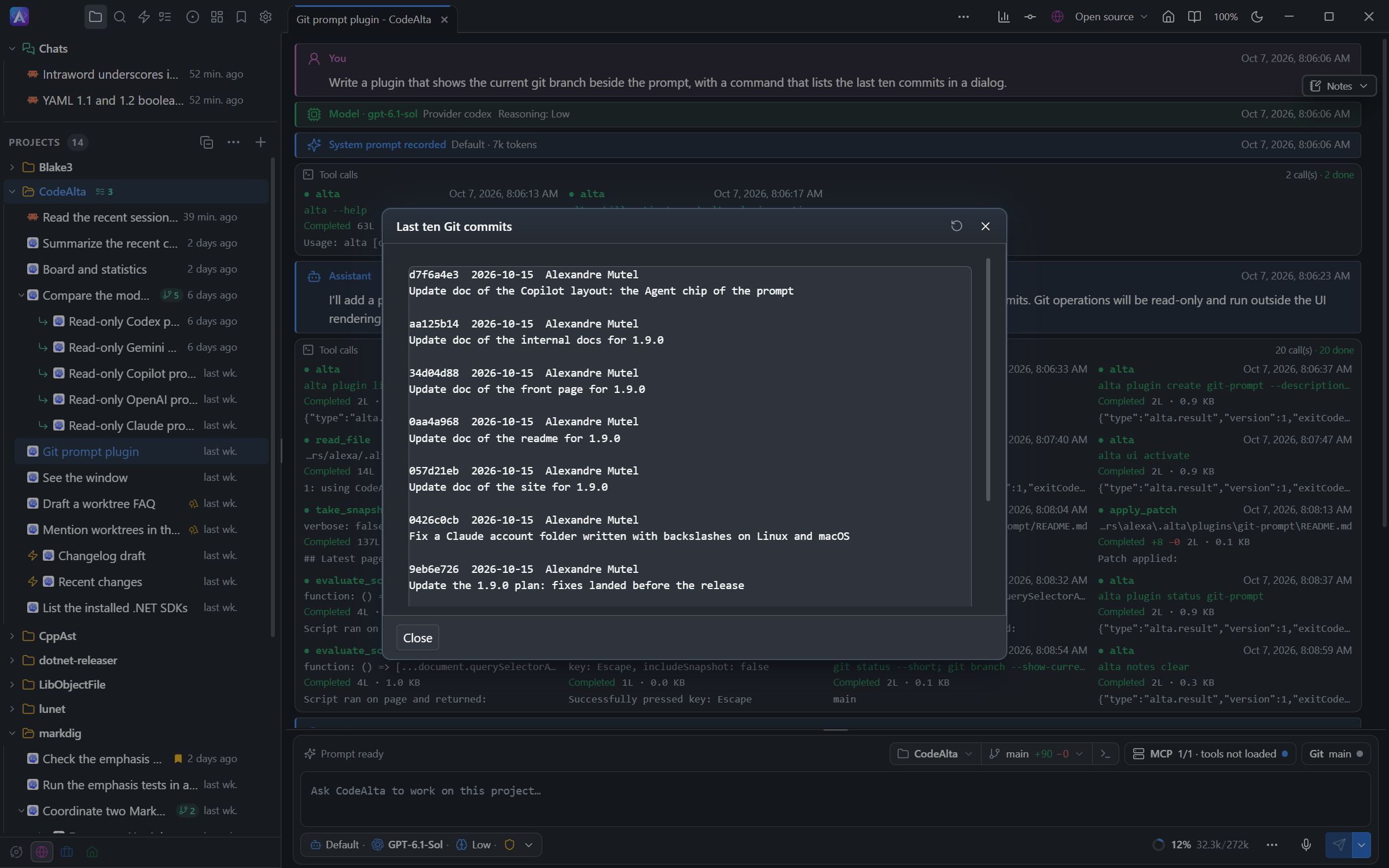
The agent creates the plugin under ~/.alta/plugins, for all your projects. Ask for a plugin for this project to keep it under the project's .alta/plugins.
The agent follows the built-in codealta-plugin-runtime skill, which has sample plugins, a script API reference and a library index for JavaScript. It works with these commands:
| Command | What it does |
|---|---|
alta plugin create <id> |
Writes a first plugin.cs under ~/.alta/plugins/<id> (or the project with --project), builds it and starts it. |
alta plugin reload <id> |
Builds again and replaces the running plugin. A failed build returns the compiler errors, and the old version keeps running. |
alta plugin status <id> |
The state of the plugin, its last build, what it adds and its errors. |
alta plugin api <name> |
A type of the plugin API with its members, from the running version of CodeAlta. |
alta plugin open <id> |
Shows the plugin to you in the code editor. |
The agent can call a tool its plugin adds in the same turn. With the UI tools, it also runs the plugin's command in the window and checks the result.
CodeAlta TUI loads plugins when it starts: the agent writes the file and you restart. A session whose permission mode asks before commands cannot create or build a plugin.
Create a plugin
In CodeAlta Desktop, open Settings > Plugins and click New plugin, then enter an id. CodeAlta creates the folder with a first plugin.cs, starts the plugin and opens it in the code editor. Choose Project at the top of the page first to create it in the selected project.
You can also create the folder yourself:
| Scope | File |
|---|---|
| All projects | ~/.alta/plugins/<package-id>/plugin.cs |
| One project | <project>/.alta/plugins/<package-id>/plugin.cs |
The package id uses letters, digits, ., _ and -, and starts with a letter or digit. A project plugin is loaded when CodeAlta starts in that project.
using CodeAlta.Plugins.Abstractions;

[Plugin("hello", DisplayName = "Hello", Description = "Adds a /hello command.")]
public sealed class HelloPlugin : PluginBase
{
    public override IEnumerable<PluginCommandContribution> GetCommands()
    {
        yield return Command.Shell("hello", "Says hello.", static async (context, cancellationToken) =>
        {
            await context.Ui.NotifyAsync("Hello from a plugin.", cancellationToken);
            return PluginCommandResult.Handled;
        });
    }
}
Click Build and reload on the plugin's row in Settings > Plugins: /hello appears among the commands of the search (Ctrl+P). In CodeAlta TUI, restart.
A plugin is a public class that inherits PluginBase, with a public parameterless constructor. The [Plugin] attribute is optional, and one file can declare several plugins.
What CodeAlta does with the folder:
- It runs
dotnet build plugin.cswith the .NET 10 SDK. No project file is needed. - It writes
Directory.Build.props,Directory.Build.targets,Directory.Packages.props,global.jsonand a.gitignorein the plugin root. Do not edit them; git keeps only your sources. - It references
CodeAlta.Plugins.Abstractions,CodeAlta.Plugins.TuiandXenoAtom.Terminal.UIfor you. - At start, it builds again a plugin whose source changed.
Add NuGet packages with #:package Name@Version at the top of plugin.cs, and more source files with #:include. An optional README.md beside plugin.cs describes the plugin in the plugin list.
Build and reload
In CodeAlta Desktop, Settings > Plugins is where you work on a source plugin, for all your projects (User) or for one (Project).
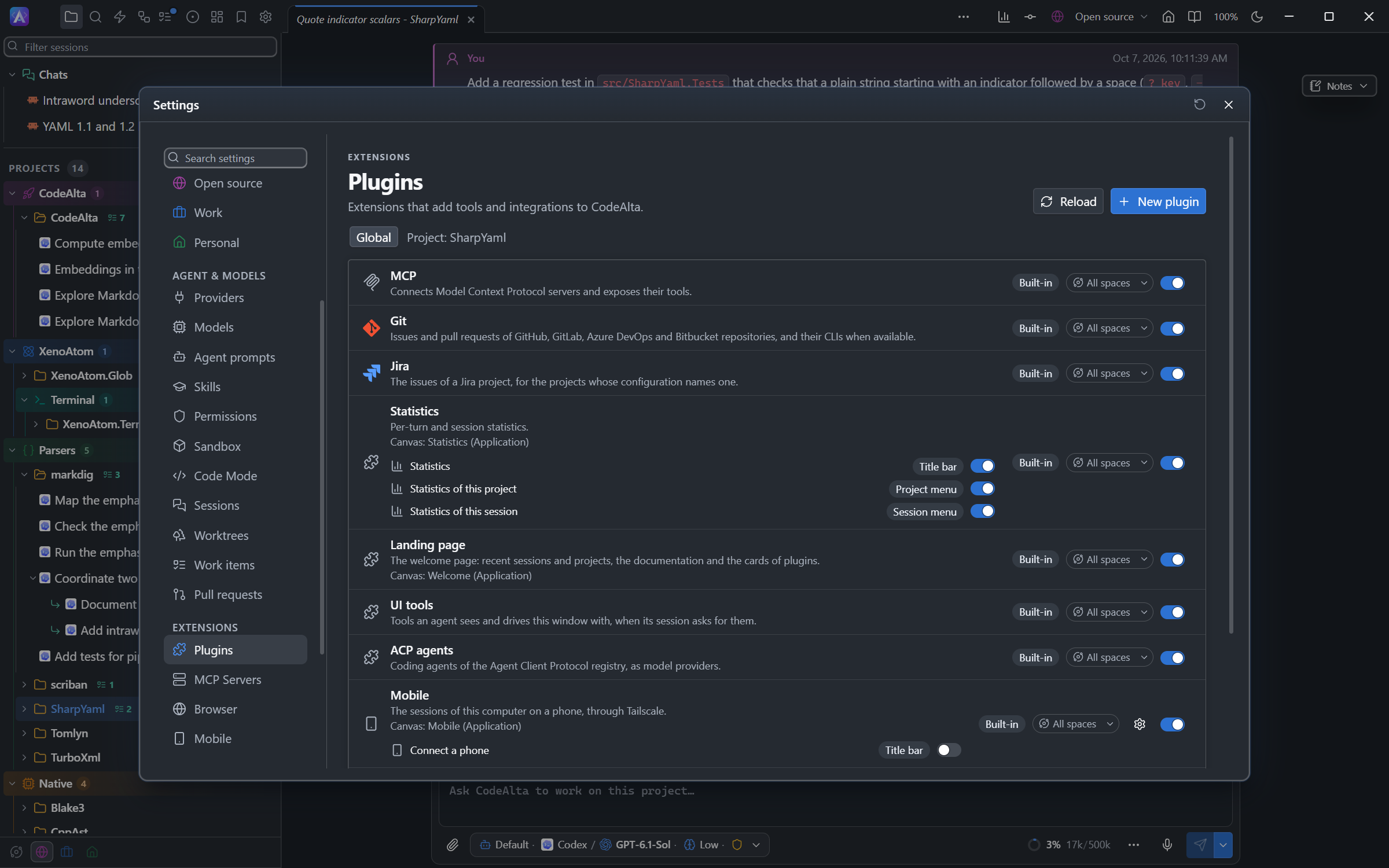
The row of a source plugin has:
- Build and reload: builds the plugin and replaces the running one. Its commands, shortcuts, status items and pickers change at once.
- Edit in the code editor: opens the plugin folder in a Plugin tab.
- Remove (red): stops the plugin and moves its folder to the trash, after you confirm. Built-in plugins cannot be removed; turn them off.
- A switch that starts or stops the plugin at once.
A failed build shows the compiler errors under the plugin, with their line, and the old version keeps running. Source changed marks a plugin whose file is not the one that runs.
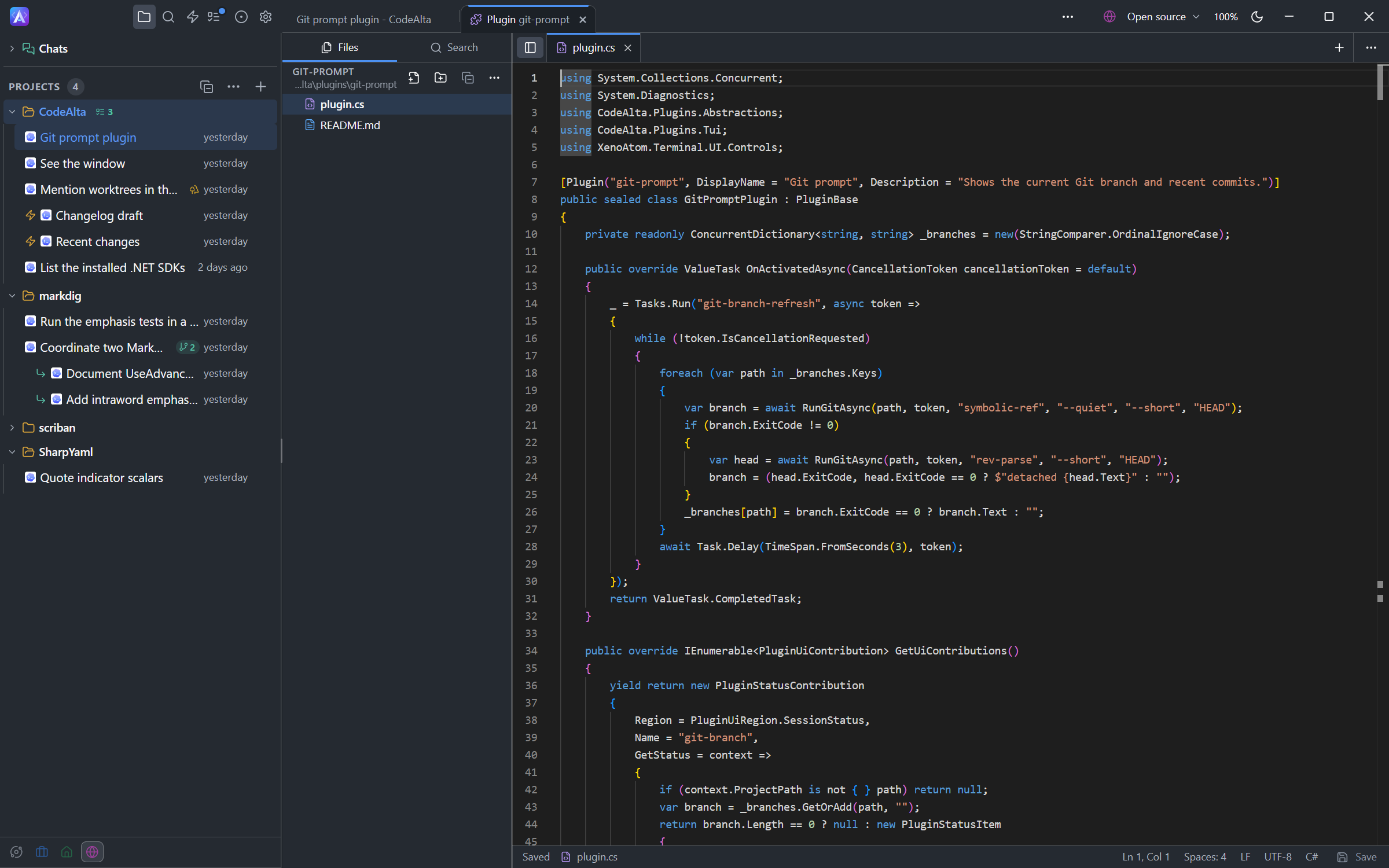
A reload starts the plugin again, with new fields. Keep data with Services.State (see Lifecycle and data).
One plugin, two apps
A plugin starts in both apps unless it says otherwise:
[Plugin("notes", Frontends = PluginFrontends.Desktop)] // or Terminal; the default is All
An app does not start a plugin that does not support it, and says so in its plugin list.
The command-line application (altacli) runs sessions without a window and starts only the plugins that name it. Add Cli when what your plugin gives agents works without a window: tools, alta commands, prompt text, hooks, model providers.
[Plugin("notes", Frontends = PluginFrontends.All | PluginFrontends.Cli)]
Most of the API is portable: each app shows it its own way. Where the look matters, you give two forms: an HTML fragment for the desktop and XenoAtom.Terminal.UI controls for the TUI. Context.Host.Frontend tells which app runs.
| What | Portable | Desktop form | TUI form |
|---|---|---|---|
| Notification, confirm, input, selection, text editor | context.Ui.NotifyAsync, ConfirmAsync, InputAsync, SelectAsync, EditTextAsync |
||
| Dialog with your own content | PluginUi.HtmlDialog |
PluginTui.CustomDialog |
|
| Content around the prompt | PluginUi.Content with Markdown or text |
PluginRenderResult.FromHtml |
PluginTui.Visual |
| Status item | PluginStatusContribution |
Command makes it clickable |
|
| Button | PluginUi.Button, with a Command or a Canvas |
||
| Prompt picker | PluginUi.PromptPicker |
||
| Timeline card | PluginDerivedSessionEvent.Markdown |
Html |
PluginTerminalDerivedSessionEvent.VisualFactory |
The desktop ignores terminal controls and the TUI ignores HTML, so a result with both forms works in both.
Contribution points and hooks
Override only the methods the plugin needs. A Get…() method is called once when the plugin starts. An On…Async method is a hook: CodeAlta calls it each time its moment comes (a tool call, the end of a run, an event), and calls only the plugins that override it.
| Method | Adds | Desktop | TUI |
|---|---|---|---|
GetCommands() |
Commands for the search or palette, the / menu and shortcuts |
yes | yes |
GetUiContributions() |
Status items and content around the prompt; buttons | yes | yes (no buttons) |
GetPromptPickers() |
A picker opened by a character typed in the prompt | yes | yes |
GetSessionEventProjections() |
Cards in the session timeline | yes | yes |
GetCanvases() |
Tabs the plugin fills, or its settings page | yes | no |
GetLandingCards() |
Cards on the welcome page | yes | no |
GetSettings() |
Settings the user changes in Settings, found by its search and by agents: see Settings | yes | no |
GetAgentTools() |
Tools the model can call | yes | yes |
GetAltaCommands() |
Commands under the in-session alta tool |
yes | yes |
GetSystemPromptContributions() |
Text added to the system or developer prompt | yes | yes |
GetInstructionProcessors() |
Changes to the final instructions of a session | yes | yes |
GetResources() |
Skills shipped with the plugin | yes | yes |
OnBeforeAgentRunAsync |
Tools and messages for one run; can cancel the run | yes | yes |
OnAgentEventAsync |
Sees the events of the sessions | yes | yes |
OnToolCallAsync, OnToolResultAsync |
Sees, blocks or changes every tool call: see Tool hooks | yes | yes |
OnAgentRunEndedAsync |
Continues a session whose run ended, with a prompt of the plugin | yes | yes |
GetPromptProcessors(), OnPromptSubmittingAsync |
Changes, answers or stops a prompt of the user before it is sent | yes | yes |
GetCompactionContributions() |
Hooks of a manual compaction: see Compaction hooks | yes | yes |
GetCommandLineContributions() |
Commands of the altatui command line |
no | yes |
The factories Command, PluginUi, PluginTui, Prompt, AgentTool, Resources, Setting and Startup build the common contributions.
OnAgentEventAsync receives the events of every session, including a delta for each streamed fragment. A plugin that reads only finished content returns false from ObservesContentDeltas and is spared those calls. A plugin that does not override OnAgentEventAsync gets no events.
Commands and dialogs
yield return Command.Shell("note-add", "Adds a note.", AddNoteAsync) with
{
    Label = "Notes: add",
    KeyBinding = new PluginKeyBinding(new PluginKeyGesture(PluginKey.F9)),
};
Command.Shellis always available,Command.Sessionneeds a selected session, andCommand.Promptbelongs to the prompt editor.- A command takes no arguments: ask the user with
context.Ui. - Return
PluginCommandResult.Handled,Cancelled, orMessage("…"). SetPromptTextto send a prompt, withEnqueuePrompt = trueto queue it. context.Sessionsandcontext.Promptsgive the session and the prompt draft the command started from.- A key binding is one stroke, or
Ctrl+Gthen a second stroke. A key CodeAlta already uses keeps its meaning. On the desktop, a single letter needsCtrlorAlt.
Dialogs
The portable dialogs work in both apps:
if (!await context.Ui.ConfirmAsync("Notes", "Delete all notes?", cancellationToken)) return PluginCommandResult.Cancelled;
var title = await context.Ui.InputAsync("Title", "Untitled", cancellationToken);   // null when cancelled
var kind = await context.Ui.SelectAsync("Kind", items, cancellationToken);
var text = await context.Ui.EditTextAsync("Note", "First line", cancellationToken);
For a dialog with its own content, build the request for the running app:
var request = Context.Host.Frontend == PluginFrontends.Desktop
    ? PluginUi.HtmlDialog("Notes", html, closeButton) with { OnAction = HandleActionAsync }
    : PluginTui.CustomDialog("Notes", visual) with { Buttons = [closeButton] };
var response = await context.Ui.ShowDialogForResultAsync(request, cancellationToken);
response.ButtonName is the button that closed the dialog, and response.Values holds the named fields of an HTML dialog. In the TUI, read your own controls. How to write the HTML and handle its actions is on Plugin UI.
Agent tools and alta
GetAgentTools() adds tools the model can call: wrap an AgentToolDefinition with AgentTool.Create. Its calls go through the tool hooks of every plugin, as the calls of any other tool do.
A session has the tools of a plugin from its next prompt. The session that created or reloaded the plugin has them in the same turn.
GetAltaCommands() adds commands under the in-session alta tool. A plugin can also run alta commands; the result has the JSONL output, the exit code and an error summary:
var result = await Services.Alta.InvokeAsync(["session", "create", "--project", projectId], cancellationToken: cancellationToken);
A prompt a plugin sends this way is titled Plugin in the timeline. When the user typed it in a page the plugin serves, pass new PluginAltaInvocationOptions { OnBehalfOfUser = true }: the timeline shows it as the user's.
Tool hooks
OnToolCallAsync is called before every tool call of a session, and OnToolResultAsync after it, with its result: the tools of CodeAlta (shell_command, write_file, apply_patch, alta, exec…), the tools of plugins and MCP servers, the calls a Code Mode script makes, and the tools an agent CLI runs itself. A hook that cares about some tools only checks context.ToolName.
| The context gives | |
|---|---|
ToolName, Arguments |
The tool and its JSON arguments, as the hooks before this one left them |
ToolKind, ToolPluginId |
BuiltIn, Plugin, Mcp or Agent (a tool the agent CLI runs itself), and the plugin that provides it |
ShellCommand |
For a shell tool (shell_command, the Bash and PowerShell of Claude Code, the commands of an ACP agent): the command and the folder it runs in, already read from the arguments |
ModifiedFiles |
The files a file tool writes, deletes or moves |
SessionId, ProjectPath, WorkingDirectory, ParentToolCallId |
The session, its folder, and the tool call of the script that makes this call |
CanBlock, CanModifyArguments, CanChangeResult |
What applies to this call, which depends on who runs the tool |
A hook returns null to let the call go on, or:
PluginToolCallResult.Block(reason): the tool does not run, and the model readsBlocked by <plugin>: <reason>as its failed result.PluginToolCallResult.ReplaceArguments(json): the call runs with other arguments, which the next plugin's hook sees.PluginToolResult.Replace(result),PluginToolResult.Append(text)(a diagnostic or a reminder for the model), orPluginToolResult.AttachDetails(json): details recorded with the call for timeline cards andOnAgentEventAsync, never sent to the model.
The hooks of the plugins run one after the other; the first that blocks ends the call. They run before the checks of CodeAlta, the permission prompt and the sandbox, which still apply to the arguments the hooks leave: a hook makes the rules stricter, never looser. A hook has HookTimeout to answer (10 seconds unless the plugin overrides it). A hook that throws or does not answer in time is logged in the plugin's errors (alta plugin status <id>) and the call goes on, unless the plugin overrides ToolHooksFailClosed to return true: the call is then blocked.
| Provider of the session | Before a call | After a call |
|---|---|---|
| Models CodeAlta runs (OpenAI, Anthropic, Google, Copilot…) | Every tool: block or change | Every tool |
| Claude Code | Its own tools (Bash, Edit, Write…): block only, the model reads why. The tools of CodeAlta: as above |
The tools of CodeAlta only |
| ACP agents | The calls the agent asks permission for: block only, and the agent is only told no. The tools of CodeAlta: as above | The tools of CodeAlta only |
This plugin checks the syntax of each PowerShell command before it runs, and gives the errors to the model:
using System.Diagnostics;
using CodeAlta.Plugins.Abstractions;

[Plugin("pwsh-check", DisplayName = "PowerShell check", Frontends = PluginFrontends.All | PluginFrontends.Cli)]
public sealed class PwshCheckPlugin : PluginBase
{
    private const string ParseScript = """
        $errors = $null
        [void][System.Management.Automation.Language.Parser]::ParseInput([Console]::In.ReadToEnd(), [ref]$null, [ref]$errors)
        $errors | ForEach-Object { "$($_.Extent.StartLineNumber):$($_.Extent.StartColumnNumber) $($_.Message)" }
        """;

    // A check that must not be skipped: a command is blocked when pwsh does not answer.
    public override bool ToolHooksFailClosed => true;

    public override async ValueTask<PluginToolCallResult?> OnToolCallAsync(PluginToolCallContext context, CancellationToken cancellationToken = default)
    {
        // The shell of CodeAlta is PowerShell on Windows; Claude Code has a PowerShell tool of its own.
        if (context.ShellCommand is not { } shell || !(OperatingSystem.IsWindows() || context.ToolName == "PowerShell")) return null;
        var errors = await ParseAsync(shell.Command, cancellationToken);
        return errors.Length == 0 ? null : PluginToolCallResult.Block("the command has syntax errors:\n" + errors);
    }

    private static async Task<string> ParseAsync(string command, CancellationToken cancellationToken)
    {
        var start = new ProcessStartInfo("pwsh") { RedirectStandardInput = true, RedirectStandardOutput = true };
        foreach (var argument in new[] { "-NoProfile", "-NonInteractive", "-Command", ParseScript }) start.ArgumentList.Add(argument);
        using var process = Process.Start(start)!;
        try
        {
            await process.StandardInput.WriteAsync(command);
            process.StandardInput.Close();
            var output = await process.StandardOutput.ReadToEndAsync(cancellationToken);
            await process.WaitForExitAsync(cancellationToken);
            return output.Trim();
        }
        finally
        {
            if (!process.HasExited) process.Kill();
        }
    }
}
Continue after a run
OnAgentRunEndedAsync is called when a run of a session ended normally: the agent answered and calls no more tools. It is not called for a run that failed or that the user stopped. Return PluginAgentRunEndedResult.Continue(prompt) to give the session a new prompt, which it shows as a prompt of a plugin: a check that the tests ran, for example. context.LastAssistantMessage is the last answer of the run. A session is continued at most 3 times in a row (context.Continuations, context.MaxContinuations); a prompt of anybody else starts the count again.
Compaction hooks
GetCompactionContributions() returns a PluginCompactionContribution whose hooks run when the user compacts a session (the Compact button or command):
BeforeCompactionruns first.PluginBeforeCompactionResult.CancelWithReason("…")stops the compaction. In CodeAlta Desktop the reason is in the timeline of the session and the prompt bar says that a plugin cancelled it; CodeAlta TUI shows it in its status line.Instructionsreturns text for the summary of the compaction, such as "Keep the list of open tasks". The summary request follows it, in CodeAlta Desktop and CodeAlta TUI; with Claude Code or an ACP agent, the text goes after its/compactcommand. It does not change the instructions of the session.AfterCompactionruns once the compaction ended:context.Succeeded, andcontext.Summary, the summary CodeAlta wrote (null when the agent compacted its own context) or the message of a failure.
The compactions a session makes by itself when its context is full, during a run, do not call these hooks.
Prompts and resources
GetSystemPromptContributions()adds text to the system or developer prompt:Prompt.Developer("…"). Keep it short: it uses context on every turn.GetPromptProcessors()andOnPromptSubmittingAsyncsee each prompt the user sends, as typed, before it is sent.PluginPromptResult.Replace(text, attachments)sends another text (return some of the attachments to drop or reorder them; in CodeAlta Desktop each has anidinMetadata).Handled(message)andCancel(message)send nothing: in CodeAlta Desktop the status line under the prompt says that a plugin handled or cancelled it, with the message.TemporaryPromptContributionsadd text to the instructions of that run only, for a prompt that is sent: a prompt that steers a turn that runs goes through the hooks too, but the instructions of that turn do not change. The prompts CodeAlta sends itself (reminders, job results, a continuation ofOnAgentRunEndedAsync) do not go through them.GetInstructionProcessors()can change the final instructions after CodeAlta composed them. CodeAlta records which plugin changed them.GetResources()ships skills with the plugin. Paths are relative to the plugin folder; the resources of a project plugin apply to that project only.
public override IEnumerable<PluginResourceContribution> GetResources()
{
    yield return Resources.SkillRoot("skills");
}
Settings
A plugin declares its settings with GetSettings(). CodeAlta Desktop shows them on the plugin's page in Settings > Extensions (above its settings canvas when it has one), finds them in the search of Settings and with Ctrl+P, and gives them to agents through alta settings and alta search --kind setting.
public override IEnumerable<PluginSettingContribution> GetSettings()
{
    yield return Setting.Integer("poll_minutes", "Check every", "How often new builds are looked for, in minutes.", defaultValue: 5, minimum: 1, maximum: 120)
        with { Group = "Builds", Keywords = ["refresh", "interval"] };
    yield return Setting.Choice("notify", "Tell me when a build", "Which builds raise a toast.", ["failed", "always", "never"], defaultValue: "failed")
        with { Agents = PluginSettingAccess.ReadWrite };
}

// Read a value when it is used; Changed says that Settings or an agent changed one.
var minutes = Services.Settings.GetInt64("poll_minutes") ?? 5;
Services.Settings.Changed += (_, change) => Logger.Info($"{change.Key} changed");
- The kinds are
Boolean,Choice,Integer,Number,Text,PathandList. A key has lower-case letters, digits and underscores;enabled,requiredandspacesare taken. - CodeAlta keeps the values in
config.tomlunder[plugins.<id>]: the user's file, or the project's.alta/config.tomlfor a setting withScope = PluginSettingScope.Project. Every setting of a plugin of a project is kept in its project. A value never changed is the default. - Agents only read a setting unless it says
Agents = PluginSettingAccess.ReadWrite. Leave a setting that protects the user, opens access or deletes data to the user. - The values can be read from
OnActivatedAsyncon.Changedis raised off the window's thread while the plugin runs, never once it stops: return quickly. A hand edit of the file is read at the nextGet…. - A plugin declares at most 64 settings; one that is not valid is left out, and Settings > Plugins says why.
Lifecycle and data
Override InitializeAsync, OnActivatedAsync, OnDeactivatingAsync and DisposeAsync only when the plugin owns something to set up or release.
Start background work with
Tasks.Run(...), never an untrackedTask.Run, so CodeAlta can cancel it on reload or unload. SetPluginTaskOptions.SessionRetentionIndependent = trueonly for work that never starts, resumes, queues or changes sessions; leave it false when unsure.Services.Statekeeps the plugin's data as JSON across runs and reloads.PluginStateScope.Userstores under~/.alta/plugin-data/,PluginStateScope.Projectunder<project>/.alta/plugin-data/:var notes = await Services.State.ReadJsonAsync<List<string>>(PluginStateScope.User, "notes", cancellationToken) ?? []; await Services.State.WriteJsonAsync(PluginStateScope.User, "notes", notes, cancellationToken);Services.Databasegives the plugin its own tables in CodeAlta's SQLite database, for data that is queried or grows. Every table name starts withServices.Database.TablePrefix, andMigrateAsyncruns each version's changes once.ReadAsyncnever waits;WriteAsyncwrites in one transaction, in turn with other writers, so keep writes short. The data stays when the plugin is turned off.var database = Services.Database; await database.MigrateAsync(1, async (connection, from, to, token) => { await using var command = connection.CreateCommand(); command.CommandText = $"CREATE TABLE {database.TablePrefix}notes (id INTEGER PRIMARY KEY, text TEXT)"; await command.ExecuteNonQueryAsync(token); }, cancellationToken);Services.Spaces.GetAssignedSpaces()gives the spaces the plugin is assigned to; an empty list means every space. CodeAlta already keeps the plugin out of other spaces: use it for what the plugin serves itself. Do not readconfig.tomlyourself: declare settings.Loggerwrites to the CodeAlta log.Keep no static references to host objects, and no secrets in plugin source.
When it does not start
| Desktop | TUI | |
|---|---|---|
| While it builds | The start-up screen names the plugin | The console shows the build before the interface |
| Build or load failure | A notice at start, and the errors under the plugin in Settings > Plugins | The error in the console and in /plugins |
| Not supported in this app | Marked in Settings > Plugins | Listed in /plugins |
| Full log | Settings > Application Logs | ~/.alta/logs/codealta.log |
In a session, alta plugin status <id> returns the same errors with file, line and column. To disable a plugin or start without plugins, see Disable or bypass plugins.
Samples
The codealta-plugin-runtime skill ships complete plugins that CodeAlta's tests build and load:
| Sample | Shows |
|---|---|
todo |
A complete plugin: commands, an HTML dialog with actions, a status item, a picker, tools, an alta command, prompt text, saved data |
hello-command |
A command |
desktop-and-terminal |
One plugin for both apps: portable dialogs, an HTML dialog, a status item, content above the prompt, a prompt picker |
saved-data |
Data kept between runs with Services.State |
settings |
Settings declared with GetSettings(), read with Services.Settings |
canvas-checklist |
A canvas for the application, a project and a session, ticked from the page, a command or an agent; buttons in the title bar and the project menu |
canvas-board |
A canvas drawn by a React script with Blueprint, a chart and alta.host, whose board lives in the plugin and is read with alta.rpc |
canvas-flow |
A canvas that draws a pipeline with React Flow: custom nodes, links, a minimap, the graph kept in the plugin |
landing-card |
A welcome page card, two commands and a canvas |
report-dialog |
A dialog with Markdown, a diagram and highlighted code |
agent-tool |
A tool the model calls |
alta-command |
A command of the alta tool |
timeline-card |
A timeline card computed from session events |
ui-status, ui-all-regions |
Status items and content in every region |
prompt-guidance |
Text added to the prompt |
instruction-path-normalizer |
A change to the final instructions |
background-task |
Tracked background work |
package-reference |
A NuGet package |
skill-root |
A skill shipped by a plugin |
multi-plugin-assembly |
Several plugins in one file |