People and Access
A CodeAlta Server knows the people of your household or company, what each may do, and who owns each machine and automation. In CodeAlta Desktop, open Settings > Fleet > People and access.
At home, the page shows your people and your machines: everything is yours, and the people you invite see what you share with them. Teams, grants and service identities appear when your organization uses them, or with Show teams, grants and service identities.
Invite a person
- Click Invite a person…, give their name and a role (Member by default), and click Invite.
- Give them the code and the address of the server, each with Copy. The code works once, for three days.
- On their computer, they open Settings > Fleet > Server, click Join an organization…, give the address and choose Use an enrollment code instead.
- Their computer shows six words. Approve it on yours when it shows the same words (see what waits for you).
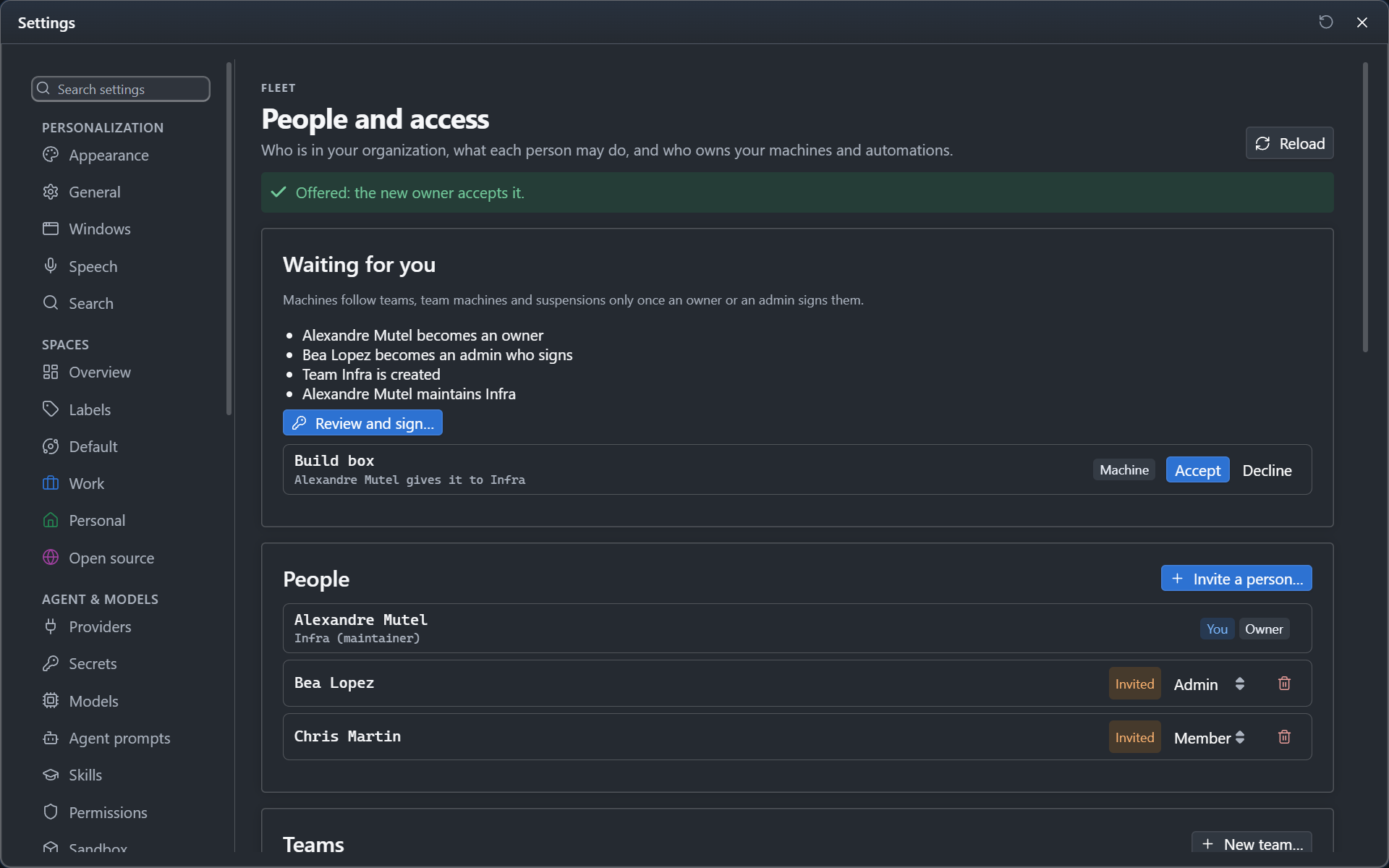
Until then they are listed as Invited. People who sign in with your company's sign-in join without an invitation, as members.
Roles
| Role | May |
|---|---|
| Owner | Everything: people, roles, teams, sign-in, machines, budgets, the audit log |
| Admin | People, teams, machines, budgets and the audit log; only an owner makes owners and admins |
| Member | Their own machines, sessions and automations, and those of their teams |
| Auditor | Reads the audit log, statistics and who can do what; changes nothing |
| Guest | Only what is shared with them |
Change a role with the menu on the row of the person. With your company's sign-in, Roles from groups can give them instead, by the id of each group (see Fleet). No role reads what others did not share: an owner or an admin sees that a session exists and what it costs, never what it says. The organization always keeps an owner.
Teams and team machines
Click New team… and add its members. A team has maintainers, who run it, and members, who use it. A team with members keeps a maintainer.
- Team machines: on the row of a machine, click Give to… and choose the team; a maintainer accepts it. Each member of the team then starts sessions on it and sees only their own sessions there; its maintainers manage it. Only its maintainers then set its budgets (Settings > Fleet > Budgets), its secrets and environments (Settings > Fleet > Secrets and environments) and its hooks; the person who enrolled it does not, unless the team gives them that role.
- Its machines run the automations of its members: off by default. Its maintainers' automations run there either way.
- On call: a maintainer turns on Take turns on call under the team and chooses the length of a turn. Its people take turns in the order of the team, and the row says who is on call now and until when. An automation of the team whose approvals go to The person on call of its team asks that person; without a rotation, it asks the whole team. Someone suspended or no longer in the team is skipped.
- Dissolve gives what the team owned to the organization.
People on your own machines
Your machines are yours: the people of your organization see and use them only when you let them. When someone tries, their first try becomes a request: the Fleet button tells you, and the page of the machine (Settings > Fleet > Machines, then the machine) shows it under People, with Let in and Refuse. Add a person… lets someone in before they ask, and the switches beside each name set what they may do: view, drive and start sessions. A person you let in sees and drives only the sessions they started there, never yours. The machine keeps this list itself: the server cannot add anyone to it.
Owners and transfers
Every machine and automation has one owner: a person, a team or the organization. Machines and automations lists them; Give to… offers one to another owner, who accepts or declines it under Waiting for you. An automation that changes owner is Paused until its new owner clicks Resume.
- Given to a person from your computer, an automation goes with what it does, sealed for their computers only. Resume on their computer adds it to their automations there (add its project to CodeAlta first), and it leaves your computer and your machines.
- Given to a team or the organization, or left by a person who left, it keeps only its facts: what it does stays sealed for its former owner, so its new owner makes it again.
Grants
A grant gives a person or a team one capability somewhere: on the organization, a team, or one machine. Add a grant… chooses who, what and where; the trash icon takes it back.
The grants are: start sessions on machines, manage machines, run automations by hand, answer the approvals of automations, see runs, set budgets, see the statistics of a team, see statistics per person, read the audit log, read the log of a machine, and read a session. Editing an automation is not granted: its machine takes new versions from the owner of the machine or the maintainers of its team only, so make the person a maintainer of the team instead.
- Who answers the approvals of an automation and takes its runs over (the people of the team that owns it, a grant to approve it), and who runs it by hand besides its maintainers (a grant to run it), reaches its machine only once an owner or an admin signs the next version of the access document (Sign what machines follow). A grant with an end date is signed with its end, and the machine refuses it from then, by its own clock.
- Reading content (a session, the log of a machine) is granted on one machine or session, never on a whole team or the organization. Read a session lists your own sessions whose title your computer opens. The grantee sees the session and its title, and reads its conversation live, through the machine that runs it, once an owner or an admin signs the next version of the access document; they never drive it.
- The server cannot read what a session says. Check The title is sealed from the server and the grant shows Waiting for keys; on a computer of yours, Confirm keys seals the title of the session for the grantee's computers only. For a team, these are the computers of its people as the signed access document names them: sign the access document first. The session and its title then appear in the grantee's Fleet page, until the grant is taken back. A computer the grantee adds later, or a person who joins the team of the grant once the access document is signed again, gets the key the next time the computer that confirmed the keys is online.
Service identities are what team and organization automations run as. A new one stays off until a person turns it on.
Team and organization providers are the providers their automations run with. Click New provider…, give it a name, choose the team or the organization it belongs to, its type, its models and the API key of the account, then Save: your computer seals the key for the machines of that team or of the organization, and keeps no copy. Those machines add the provider with that key, so the editor of an automation placed on one of them offers it. The trash icon removes it, and its machines delete the key. To change the key, set the provider again under the same name.
Automations of a team
When an automation runs on a machine of a team you maintain, Publish to in its editor makes it an automation of that team: the team owns it, and every maintainer can run it. On a machine of the organization, owners and admins publish it to the organization the same way. Me keeps it yours.
Another maintainer finds it in the Automations tab under Automations of your teams. Open in my editor adds it to their automations as its machine runs it and opens it in the editor; what they save goes to the machine as the next version, and the other maintainers see it.
- It runs only while the team has a service identity turned on, once that change is signed (see Sign what machines follow).
- A machine of a team runs automations with account credentials only: an API key or a gateway, never a personal plan such as a Claude, Codex or Copilot subscription.
A machine given to the organization runs the automations of the organization only. They run as a service identity of the organization, with account credentials only. Its owners and admins manage it: only they set its budgets, its secrets and environments and its hooks, and each sees only their own sessions there; the person who enrolled it does not, unless they are an owner or an admin.
Sign what machines follow
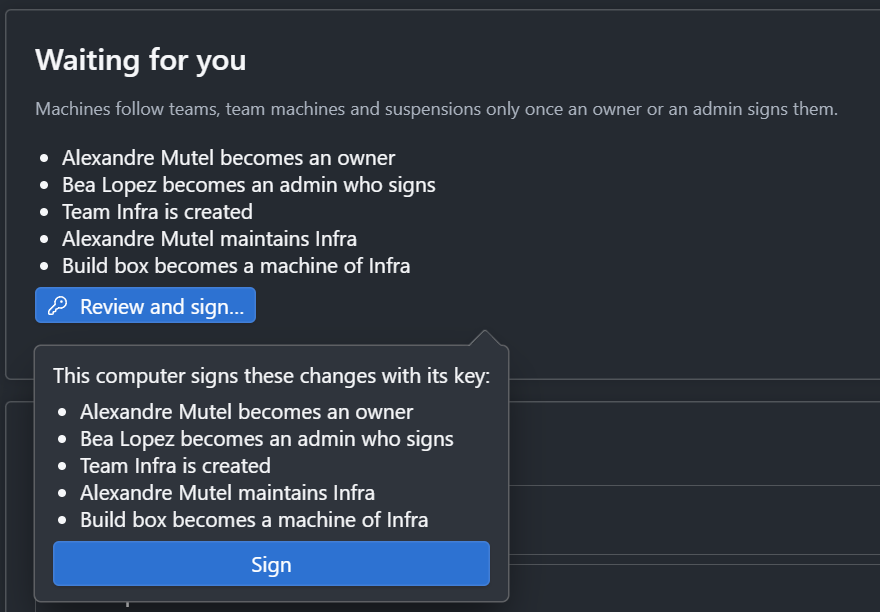
Machines never take teams, team machines or suspensions from the server alone: they follow them once an owner or an admin signs them. When something changed, Waiting for you lists it under Changes machines do not follow yet. Click Review and sign…: your computer reads the changes itself, lists them, and signs them with its key when you click Sign. A change made by a maintainer who is not an admin waits there too.
When a person leaves
On their row, click the trash icon, choose who takes what they owned (the organization, a team or a person), and click Remove from the organization:
- they are suspended at once, and the server refuses their devices;
- your computer signs their devices out of the list of devices;
- what they owned goes to the one you chose, paused until resumed; resources whose owner left are listed under Waiting for you;
- once you sign, team machines stop their sessions and refuse the automations they gave.
Agents and access
Agents read people and access with alta fleet access show, people, teams, grants, owners, transfers and review. They never change access: alta fleet access propose records a change, which appears under Waiting for you with Apply and Dismiss.
Access review
Owners, admins and auditors click Copy who can do what (CSV) to copy every role, team role, grant and owner, for a review. Every change of access is in the audit log of the server, refused attempts included.