Fleet
CodeAlta works on one computer and needs nothing else. Fleet adds two steps for when you want more: run sessions on your other computers, then bring your people and machines together around a server. Each step is optional and builds on the one before; stop at the one that fits you.
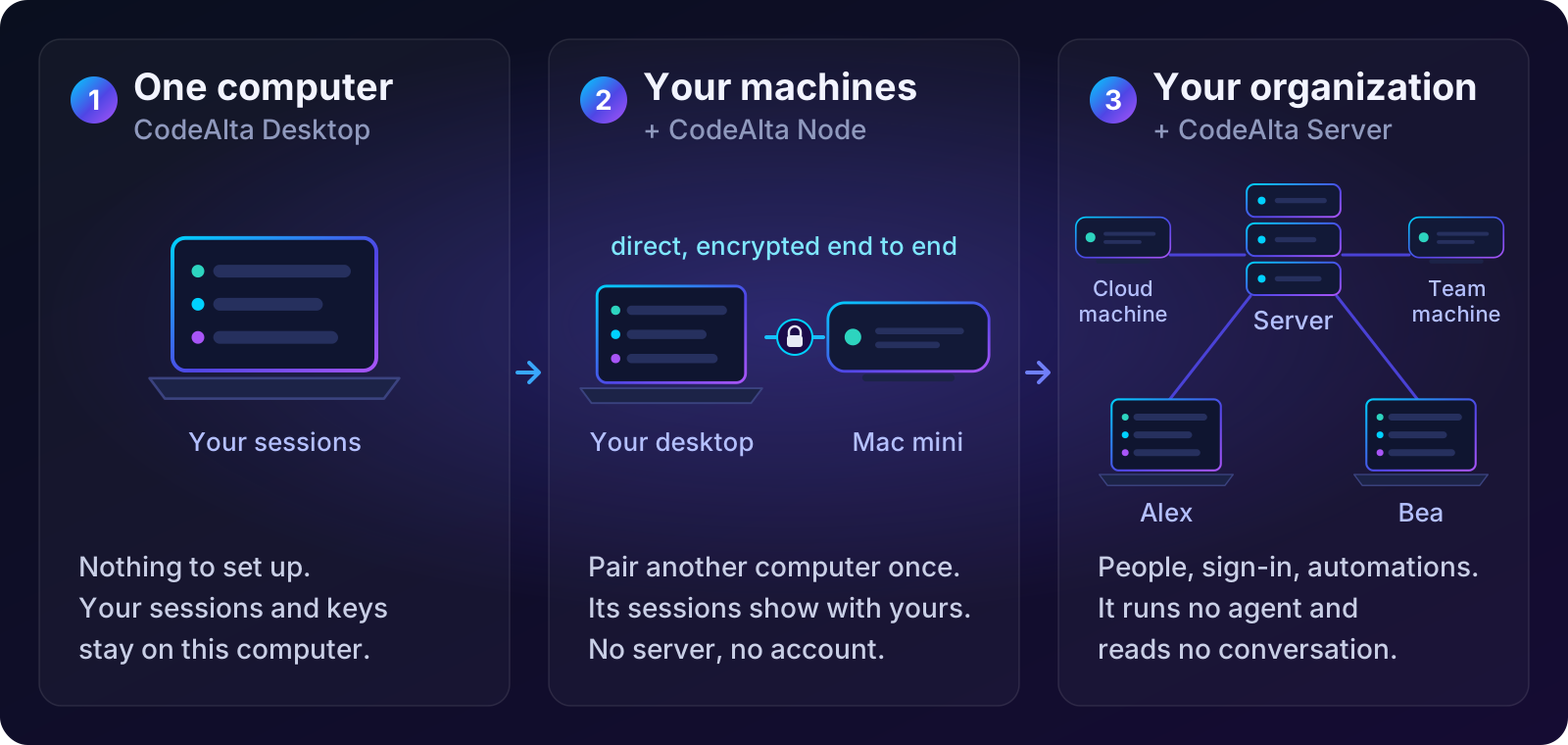
One computer
This is CodeAlta as you know it. CodeAlta Desktop, or CodeAlta TUI in a terminal, runs your sessions on this computer with your providers and your keys. There is no account and no server, and nothing leaves this computer except what your providers receive.
Your machines
Pair your other computers with this one. Another computer that runs CodeAlta Desktop pairs in a minute, from a link and six words, with nothing to install; a computer that must stay on without a window, such as a Mac mini, a build machine or a small cloud server, runs CodeAlta Node (altanode). Pair it with CodeAlta Desktop once, and its sessions are listed beside yours. You read them, answer their questions, send them prompts and start new ones there. You can move a session from one machine to another, and run your automations on the machine that suits them.
Your computers talk to each other directly, encrypted end to end. Each machine keeps its own sessions, providers and sign-ins: nothing is copied from one computer to another, and no server is involved.
- Your machines: pair two CodeAlta Desktops, add a machine over SSH or with a pairing link, run it as a service, update it.
- Work on your machines: see and drive their sessions, start one there, move a session, let agents use your machines.
Your organization
CodeAlta Server (altaserver) is one place your computers connect to, for you alone or for a whole team. You run it on a computer of yours or on a server of your company. It adds:
- People and teams. Invite a person with a link; they sign in with Microsoft, Google, GitHub, a passkey or your company's sign-in. A team shares its machines and automations.
- Reach. Every computer keeps one outgoing connection to the server, so a machine at home or in the cloud is reachable from anywhere, without opening a port.
- Work for everyone. Automations run on the right machine, budgets cap what machines spend, and you see the statistics of all your machines, update them all at once and give them secrets.
- Control. Policies set what machines may do, a kill switch stops every machine at once, and an audit log records who did what.
Start with CodeAlta Server, then People and access and Policies and audit.
What the server cannot do
A server is useful, but your machines do not have to trust it:
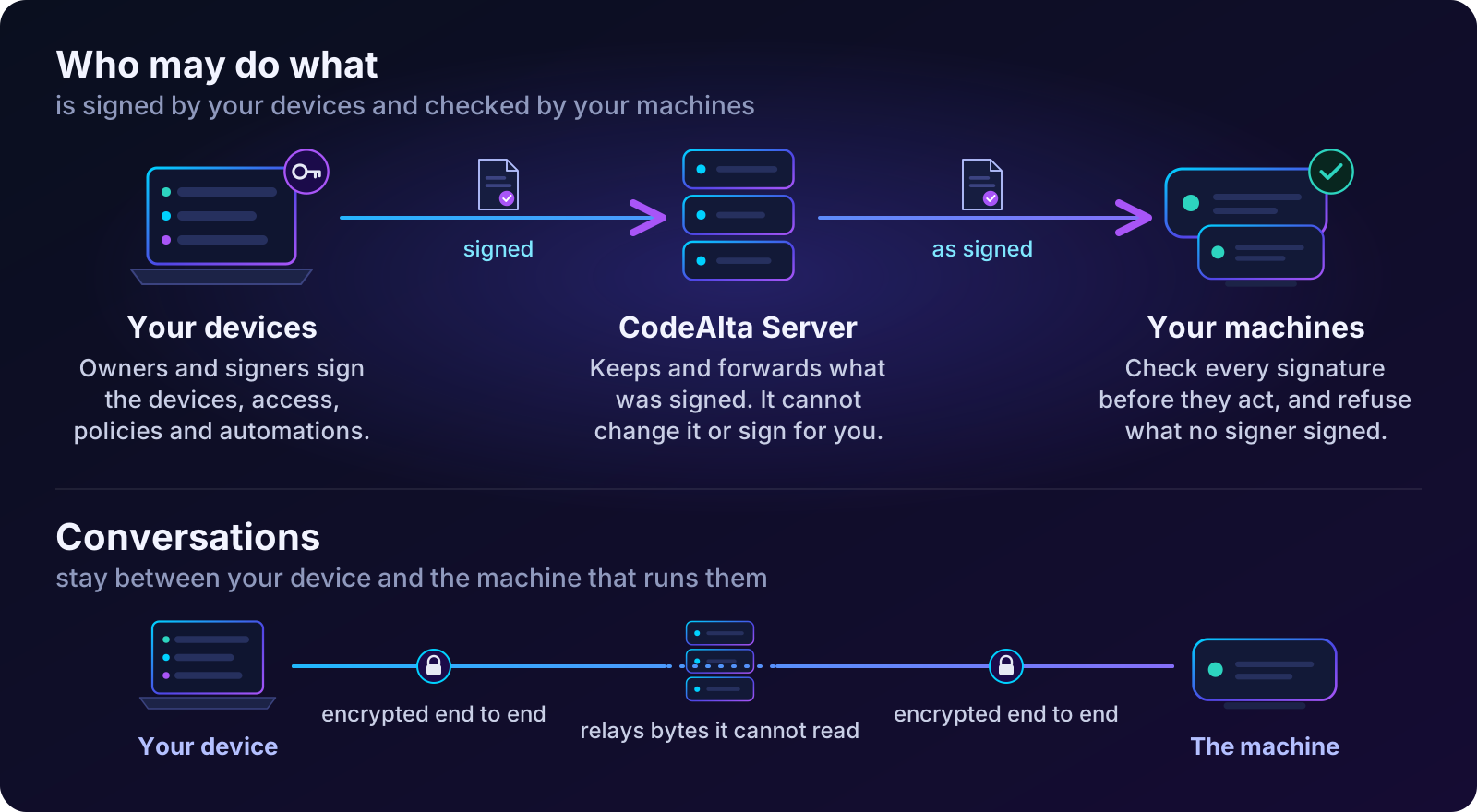
- It runs no agent and reads no conversation. A conversation travels between your device and the machine that runs it, encrypted end to end. When the server relays it, it passes bytes it cannot read.
- It cannot give anyone access. Who may do what (the devices of your organization, its people and teams, its policies and automations) is signed by the devices of its owners and signers. Every machine checks those signatures and refuses what no signer signed.
- It holds no secret in clear. A secret you give your machines is sealed on your computer for the machines allowed to use it; the server, and any backup of it, keeps copies it cannot open.
- Your machines do not depend on it. When the server is down, machines keep running their sessions and the automations that can run offline, and catch up when it returns.
The details are in Security.
The programs
| Program | Runs on | What it does |
|---|---|---|
CodeAlta Desktop (alta) |
Your computer | Where you work: your sessions, those of your machines, and the console of your fleet: machines, people, automations, statistics, policies |
CodeAlta TUI (altatui) |
Your computer, in a terminal | Your sessions, as before |
CodeAlta Node (altanode) |
A machine that stays on, as a service | Runs sessions and automations, with no window |
CodeAlta Server (altaserver) |
A machine every computer reaches | Connects your computers and people; runs no agent |
Start here
| I want to… | Go to |
|---|---|
| Reach my other laptop or desktop | Pair two CodeAlta Desktops |
| Run sessions on my Mac mini or build machine | Add a machine |
| Reach my machines from anywhere | Create my server |
| Join the CodeAlta of my company | Join an organization |
| Share a build machine with my team | Teams and team machines |
| Let agents start work on another machine | Let agents use the fleet |
| Stop every machine at once | The kill switch |
Words you will meet
| Word | Meaning |
|---|---|
| Machine | A computer that runs CodeAlta Node, or CodeAlta Desktop while it is open |
| Pairing | Telling two computers to trust each other, once, with a link or a code |
| Organization | Everything one server connects: its people, teams, machines and automations |
| Owner and signer | The people whose devices sign who may do what; machines follow only what they signed |
| Team machine | A machine a team shares; its members use it for their own sessions |
| Linked space | A space whose sessions a server sees; your other spaces stay private |
| Recovery key | 32 words that let the owner take the organization back on a new computer |